# 사용자 인터페이스

## 📘 DS 사용자 인터페이스 매뉴얼

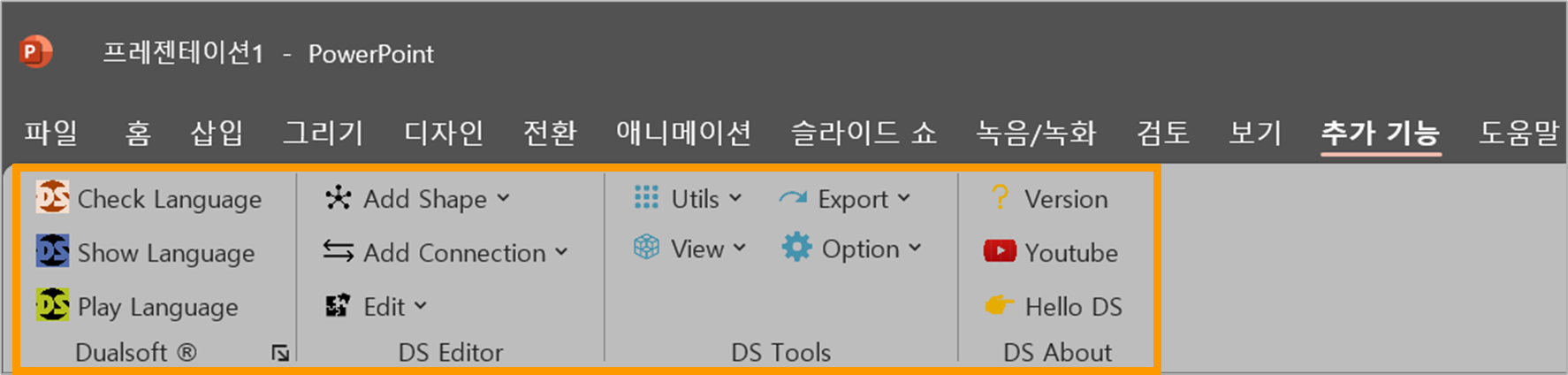
<figure><img src="/files/mRgzaTyBTXVElo7ogyZW" alt=""><figcaption><p>PowerPointAddIn 설치 시 탭메뉴에 추가기능 활성화 됨</p></figcaption></figure>

***

### 1️⃣ Language

#### ✔️ `Check Language`

* **DS 구문 유효성 검사**
* 작성된 모델이 **DS 언어 문법에 맞는지 검토**
* 에러 발생 시 해당 위치 및 오류 메시지 출력

#### ✔️ `Show Language`

* 슬라이드 상의 도형 모델을 **DS 언어(TEXT)** 형식으로 변환
* 변환된 DS 코드를 검토하거나 저장 가능

#### ✔️ `Play Language`

* 모델링된 도형 및 연결선(Edge)을 **시뮬레이션 형태로 실행**
* **동작 흐름, 상태 변화, 오류 포인트 시각적 확인 가능**

***

### 2️⃣ Modeling 도구

#### ✔️ `Add Shape`

* 새로운 DS 도형 생성

|     도형 유형     |           기능          |
| :-----------: | :-------------------: |
|    **Work**   |     실행 단위 제어 블록 생성    |
|   **Action**  |  실제 장비와 입출력 제어 수행 도형  |
| **Interface** |     외부 API 연동 포인트     |
|    **Load**   |     외부 라이브러리 로딩 블록    |
| **Condition** | 조건 판단용 마름모 도형 (연산 조건) |

***

#### ✔️ `Add Connection`

* 도형 간 **엣지(Edge, 연결선)** 생성

|     연결 유형    |        설명        |
| :----------: | :--------------: |
|    `Start`   |    제어 흐름 시작 연결   |
|    `Reset`   |     리셋 시퀀스 연결    |
| `StartReset` |  시작과 리셋을 동시에 연결  |
|  `SelfReset` |     자기 자신 리셋     |
|  `Interlock` |  조건 연결 또는 상호 제어  |
|  `EdgeGroup` | 병렬 실행 그룹 등 묶음 엣지 |

***

#### ✔️ `Edit`

* 엣지(Edge)의 **형태 또는 방향**을 편집

|          기능         |          설명         |
| :-----------------: | :-----------------: |
|  `Reverse Connect`  |    연결 방향을 반대로 변경    |
| `Reverse Line Dash` | 실선 ↔ 점선 전환 (의미 변경용) |

***

### 3️⃣ Utils

#### DS 관련 유틸리티 모음

|            기능            |            설명            |
| :----------------------: | :----------------------: |
|      `Add I/O Table`     | PLC IO 설정 및 태그 테이블 자동 구성 |
| `Auto Fill Device Color` |      디바이스별 자동 색상 채우기     |
|      `DS Pilot Run`      |     DSP 모니터링 프로그램 실행     |

***

### 4️⃣ View

#### 시각적 도식화 도구

|      기능      |           설명           |
| :----------: | :--------------------: |
|  `Animation` |  도형의 상태 전이를 애니메이션으로 표시 |
| `Time Chart` | 동작 시간 순서를 타임라인 형태로 시각화 |

***

### 5️⃣ Export

#### 제어 코드 및 구성 요소 출력

<table><thead><tr><th width="360" align="center">기능</th><th align="center">설명</th></tr></thead><tbody><tr><td align="center"><code>PC</code></td><td align="center">DS 언어 기반 PC 제어 코드 생성</td></tr><tr><td align="center"><code>PLC</code></td><td align="center">PLC 프로젝트용 코드(.xgwx) 생성</td></tr><tr><td align="center"><code>Export IO List</code></td><td align="center">사용된 IO 항목 목록을 표로 출력</td></tr><tr><td align="center"><code>Export HMI Template</code></td><td align="center">HMI 버튼, 램프 템플릿 자동 생성 출력</td></tr></tbody></table>

***

### 6️⃣ Option

#### 실행/설정 관련 옵션

<table><thead><tr><th width="360" align="center">옵션</th><th align="center">설명</th></tr></thead><tbody><tr><td align="center"><code>Sim From NotePage</code></td><td align="center">현재 슬라이드(노트 페이지) 기준 시뮬레이션 시작</td></tr><tr><td align="center"><code>Sim From DS File</code></td><td align="center">저장된 DS 파일 기준으로 시뮬레이션</td></tr><tr><td align="center"><code>H/W Setting</code></td><td align="center">대상 하드웨어 설정 (PLC Base/Slot 등)</td></tr></tbody></table>

***

### 7️⃣ Version

* 현재 설치된 **DS 버전 정보**를 확인

***

### 8️⃣ Youtube

* DUALSOFT 공식 유튜브 링크 연결
* 👉 *“좋아요와 구독 부탁드립니다\~”*

***

### 9️⃣ Hello DS

* **DS 기본 샘플 프로젝트(PPT)** 열기
* 모델링, 코드 생성, PLC 확인까지 **전체 흐름 학습용 예제**

***


---

# Agent Instructions: Querying This Documentation

If you need additional information that is not directly available in this page, you can query the documentation dynamically by asking a question.

Perform an HTTP GET request on the current page URL with the `ask` query parameter:

```
GET https://dualsoft-1.gitbook.io/dualsoft/manual/ds-app/ds-ppt/ds/undefined.md?ask=<question>
```

The question should be specific, self-contained, and written in natural language.
The response will contain a direct answer to the question and relevant excerpts and sources from the documentation.

Use this mechanism when the answer is not explicitly present in the current page, you need clarification or additional context, or you want to retrieve related documentation sections.
