> For the complete documentation index, see [llms.txt](https://dualsoft-1.gitbook.io/dualsoft/llms.txt). Markdown versions of documentation pages are available by appending `.md` to page URLs; this page is available as [Markdown](https://dualsoft-1.gitbook.io/dualsoft/manual/ds-app/ds-ppt/ds-1/hellods.md).
# HelloDS 샘플 배워보기
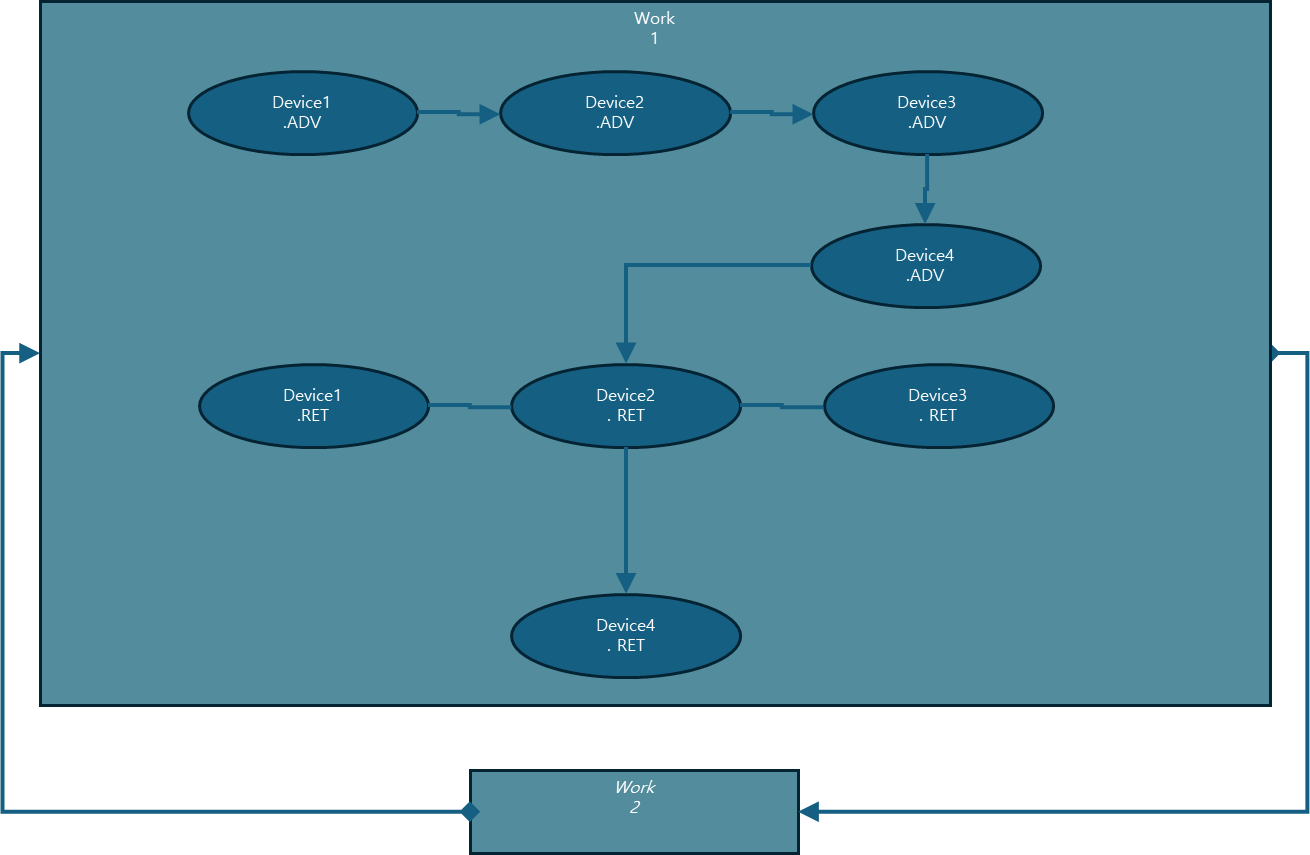
#### 📌 이미지에서 보여주는 **Work1 내부 로직**은 **DAG(Directed Acyclic Graph, 방향성 비순환 그래프)** 기반으로 구성된 제어 흐름으로, 4개의 전후진 실린더(Device1\~Device4)를 조합하여 **순차적/병렬적 동작 제어**를 구현하고 있습니다.
***
### 1️⃣ 개요: Hello DS란?
**Hello DS**는 DS(DualSoft Studio)에서 기본 제공하는 **모델링 샘플 프로젝트**입니다.\
DS 언어 기반의 흐름 제어 모델을 사용하여 **PLC 프로그램을 자동 생성**하고,\
**XG5000**에서 실행 가능한 프로젝트를 만들 수 있도록 설계되었습니다.
#### ✔️ 주요 목적
* DS 언어와 모델링 방법 학습
* 실린더 시퀀스 제어 흐름 이해
* DS → PLC 프로젝트 생성 전체 과정 체험
***
### 2️⃣ 실행 방법 요약
단계
작업
1
DS 리본 메뉴에서 [Hello DS] 버튼 클릭
2
샘플 PowerPoint 모델 파일(PPT) 자동 오픈
3
리본 메뉴의 [언어 변환] 버튼 클릭 → DS 언어 + PLC 프로젝트 생성
4
변환 결과창에서 [PLC 프로젝트] 버튼 클릭
5
생성된 .xgwx 파일을 XG5000에서 열어 확인
***
### 3️⃣ Work1 제어 로직 구조 설명
#### 🧠 기반 구조: **DAG (방향성 비순환 그래프)**
Hello DS의 핵심은 DAG 기반의 **전후진 실린더 제어 흐름**입니다.\
4개의 실린더(Device1 \~ Device4)를 제어하는 흐름은 다음과 같이 나뉩니다:
***
#### ▶ 순차 제어 구간 (전진 ADV)
```
Device1.ADV → Device2.ADV → Device3.ADV → Device4.ADV
```
* 하나의 전진 동작이 끝난 후 다음 전진으로 진행
***
#### ▶ 병렬 제어 구간 (후진 RET)
```
Device1.RET + Device2.RET + Device3.RET → Device4.RET
```
* Device1, Device2, Device3는 **동시에 후진**
* 이 3개의 후진 완료 후 → **Device4 후진**
***
### 4️⃣ Work1 ↔ Work2 반복 구조
```
[Work1 수행]
↓
[Work2 리셋]
↓
[Work2 수행]
↓
[Work1 리셋]
↓
(반복)
```
* Work1이 완료되면 → Work2를 리셋 후 시작
* Work2가 완료되면 → 다시 Work1 리셋 후 시작
* **서로를 번갈아 제어**하며 무한 루프 가능
***
### 5️⃣ 전체 동작 흐름 요약
| 항목 | 내용 |
| ------------- | ------------------------------------- |
| 🔼 전진 순서 | Device1 → Device2 → Device3 → Device4 |
| 🔽 후진 순서 | Device1\~3 병렬 후진 → 완료 후 Device4 후진 |
| ✅ Work1 완료 조건 | 모든 후진 완료 시점 (Device4.RET 종료) |
| 🔁 다음 단계 | Work2 리셋 후 시작 (반복 수행 구조) |
***
### 6️⃣ 실습 팁 및 주의사항
* 각 실린더 동작은 DS Library에서 제공하는 **Cylinder/DoubleCylinder** 사용
* `DeviceX.ADV`, `DeviceX.RET`는 각각 **전진/후진 명령 Action**
* 모든 Action 도형은 반드시 **Work1 안쪽**에 포함되어야 함
* **도형 연결 순서**가 동작 흐름을 결정하므로 DAG 구조 주의
* 언어 변환 전, **입출력 I/O 매핑** 및 **PLC IO 설정** 필수
***
### 7️⃣ 실습 완료 후 결과물
| 항목 | 내용 |
| --------- | ------------------------------ |
| DS 언어 코드 | DSL 기반 흐름 제어 명령 자동 생성 |
| PLC 프로젝트 | `.xgwx` 파일 생성 → XG5000에서 열기 가능 |
| HMI 구성 요소 | 버튼, 램프 등 자동 생성 가능 (옵션) |
***
### 🏁 마무리
Hello DS는 **DS 기반 제어 모델링의 입문 예제**로 매우 효과적입니다.\
**시퀀스 제어, PLC 코드 자동 생성, HMI 구성까지 한 번에** 배울 수 있습니다.